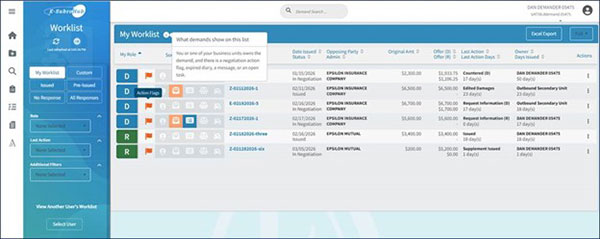
- There is an active action flag from a negotiation event submitted by the other party or an expired diary (flag icon).
- There is a message initiated by the other party (envelope icon).
- You have a pending task assignment (clipboard icon). A demand may be tagged with one or all of the possible icons.
In addition to the notification symbol, the demand will need to be owned by the user viewing the Worklist or a business unit to which the user is associated. The user handling the demand may see their name or the name of a business unit under the “Owner” column. In most circumstances, a user would expect to see business unit’s demands as part of an internal E-Subro Hub workflow.
Assigning a Demand
If a demand is incorrectly included in your Worklist, it will need to be assigned to the correct user. Editing the demander/responder rep information will not change the ownership of the demand; the demand will need to be properly assigned to update ownership. To update the ownership, click the “Assign” tab within the demand and indicate the correct owner.
Demands Owned by Business Units
If the demand is owned by a business unit and you are not participating in the internal workflow, then one of two things may be occurring:
- The demand has been assigned to the business unit in error. Again, assigning the demand to the appropriate workflow business unit would need to be completed.
- Alternatively, your login profile is associated to the business unit in error. If this is the case, a security administrator in your organization would need to be notified and update your profile configuration.